

Do you use video streaming platforms like Netflix, and how often? Do you do any online gaming? Are you a basic internet user? These are just some of the questions we ask customers when they call in to sign up for internet services.
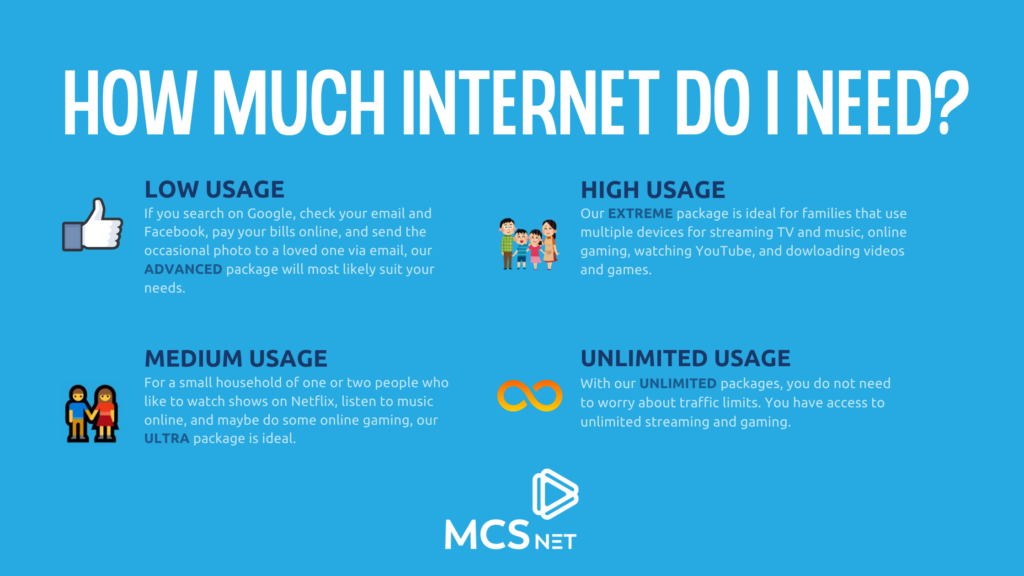
For instance, if a family of four is signing up for MCSnet services and they each have a phone and/or tablet, they all want to stream Netflix on their smart TV or through their gaming console, and a couple of them want to do some online gaming, we would most likely suggest our Extreme to Unlimited package which provides enough traffic month to cover heavy usage. However, our recommendation may defer if it’s a household with low internet data usage.
According to the Canadian Radio-television and Telecommunications Commission (CRTC), data consumption among residential high-speed internet subscribers has increased substantially in recent years, with the average downloaded data per month per subscription in 2025 being estimated to be over 500 GB, a 126% increase from 2019. This means that the average internet data usage has significantly increased, and households need internet plans and offerings that take this into account.
Internet Data Consumers In Households
The biggest data hogs are streaming videos and downloading video games, movies, or software updates. Netflix alone can use up to 7 GB of data per hour if you are watching in Ultra HD. And one video game download can eat up to 50 GB of your monthly traffic limit.
Video Streaming
GlobalWebIndex reports that 92 percent of internet users now watch videos online each month, meaning that more than four billion people around the world are consuming online video content almost daily.
Streaming platforms like Netflix have accounted for heavy video streaming in households, and Netflix data usage varies significantly based on resolution, with high-definition (HD) streaming consuming roughly 3 GB per hour, while 4K Ultra HD can consume up to 7 GB per hour. Standard Definition (SD) is much more efficient, using around 0.7 GB to 1 GB per hour.
Here is a chart outlining estimated monthly data usage based on streaming 2 hours a day for 30 days. This includes one user and doesn’t take into account the amount of data the other members of your household are using.
Netflix Monthly Data Usage Chart (2 Hours/Day)
| Quality | Data per Hour | Estimated Monthly Data (60 Hours) |
| Low (Basic) | ~0.3 GB | ~18 GB |
| Medium (SD) | ~0.7 GB | ~42 GB |
| High (HD/1080p) | ~3.0 GB | ~180 GB |
| Ultra HD (4K) | ~7.0 GB | ~420 GB |
Netflix and other streaming apps do allow you to adjust playback settings. But with most televisions boasting HD and 4K definition resolution in their specs, many users prefer to watch movies and TV series at resolutions better than the standard definition.
Online Gaming
Online gaming typically consumes between 40 MB and 300 MB of data per hour, depending on the video game and the playback settings, this is according to Jetpac Global. This is significantly less than video streaming. Usage varies by game type; fast-paced shooters like Call of Duty take up to 160MB+, while slower, open-world, or mobile titles use less data, but increase with high player counts, high-tick-rate servers, and active voice chat.
Downloading a game is a different story. Since most games need to be downloaded, one game could use up to 50 GB in a single download. And remember that many of these games need to be updated as well, which is another download and more GB.
Smart Home
In smart homes, devices such as home security and whatever new technology comes our way contribute to the increasing need for data and reliable high-speed internet.
Smart home data usage varies significantly based on security camera usage, but generally ranges from 150 GB to over 700 GB+ per month for heavy users. While basic smart devices (lights, plugs) use minimal data, security cameras/doorbells can consume 30 – 400 GB, and 4K streaming adds a substantial load.
Basic Usage
A basic or light internet-using household that focuses on email, social media, bill payments, music streaming and web browsing typically uses less than 100 GB of data per month. For a single person who is an extremely light user, usage can be as low as 2 GB to 10 GB per month, according to a Consumer Cellular Blog Post.
Our Internet Data Usage and Packages Recommendations
If you don’t want to worry about traffic limits, unlimited packages are the way to go. The demand for unlimited internet packages is also on the rise and is one of the reasons why we offer this option. The percentage of subscriptions to internet service packages with unlimited monthly data transfer has significantly increased.
The infographic below explains some of the common uses and the packages we would most likely recommend to you. As with all of our packages, you can upgrade to a higher package at any time. You must remain on the upgraded package for 30 days before downgrading.
Common Internet Terms Explained
- GB (Gigabyte)
A gigabyte is a unit used to measure data. Internet usage is often measured in GB. The more videos you stream, games you download, or files you upload, the more GB you use. - MB (Megabyte)
A megabyte is smaller than a gigabyte. 1 GB = 1,000 MB in simple everyday usage. Small online activities may use MB, while larger ones are usually measured in GB. - Data Usage
This is the amount of internet data you use in a month through things like browsing, streaming, gaming, video calls, downloads, and smart devices. - Traffic Limit / Data Limit
This is the amount of data included in your internet package before overage rules, slowdowns, or plan limits may apply. - Unlimited Internet
An internet package that does not require you to worry about a set monthly data cap or traffic limit. - Streaming
Watching or listening to content online without downloading the entire file first. Examples include Netflix, YouTube, Spotify, and other video or music services. - SD (Standard Definition)
A lower video quality setting that uses less data than HD or 4K. - HD (High Definition)
A clearer and sharper video quality than SD, but it uses more data. - 4K / Ultra HD
A very high video resolution that looks sharper than HD but uses much more data. - Download
When data is transferred from the internet to your device. Downloading games, movies, updates, or large files can use a lot of data. - Upload
When data is sent from your device to the internet. Uploading videos, backing up files to the cloud, or sending large attachments all use upload data. - Bandwidth
Bandwidth is the amount of data your internet connection can handle at one time. More bandwidth can help households with many devices or people online at the same time. - Smart Home Devices
Internet-connected devices in your home, such as video doorbells, security cameras, smart thermostats, plugs, and smart speakers.
Frequently Asked Questions About Internet Usage
1. How do I know how much internet I need?
It depends on how many people are in your household, how many devices are connected, and what you do online. A person who mostly checks email, browses websites, and uses social media will need much less data than a family streaming TV, gaming, downloading large files, and using smart home devices.
2. What activities use the most internet data?
The biggest data users are usually video streaming, large downloads, video game downloads, software updates, and some smart home devices like security cameras. Streaming in HD or 4K can use a lot of data very quickly.
3. Does watching Netflix use a lot of data?
Yes. Netflix and other streaming platforms can use a significant amount of data, especially at higher picture quality settings. Netflix streaming ranges from about 0.3 GB per hour on low quality to 7 GB per hour on Ultra HD/4K.
4. Does video quality affect how much data I use?
Yes. The higher the video quality, the more data it uses. Standard Definition uses much less data than HD, and 4K uses the most. If you are trying to reduce data use, lowering your streaming quality can help.
5. Does online gaming use a lot of data?
Online gaming usually uses less data per hour than video streaming. However, downloading a game or installing updates can use a lot of data at once. That is why gamers may still need a larger package even if the gameplay itself does not use huge amounts of data.
6. Why do game downloads use so much data?
Many modern games are very large files. A single game download can use up to 50 GB, and updates can add even more. If more than one person in a household games regularly, data use can add up quickly.
7. Do smart home devices use a lot of internet?
Some do, some do not. Devices like smart plugs and lights usually use very little data. But smart security cameras, video doorbells, and heavy smart home setups can use much more, especially if they stream or store a lot of video.
8. Is a low-data internet package enough for one person?
It can be, depending on how they use the internet. A single light user who mainly browses the web, checks email, streams music, and uses social media may be fine with a lower-usage package. But if that person streams a lot of video, games, or works from home, they may need more.
9. What kind of household usually needs a higher data package?
A larger household with several connected devices, regular video streaming, online gaming, YouTube use, downloads, and smart devices will usually need a higher package. Families with heavier usage may be better suited to Extreme or Unlimited options.
10. Should I choose unlimited internet?
Unlimited internet is a good option for households that do not want to worry about traffic limits, especially if they stream often, game, use many connected devices, or have unpredictable usage month to month.
11. Can I upgrade my internet package later?
Yes. MCSnet customers can upgrade to a higher package at any time. Enjoy the upgraded package for 30 days before downgrading.
12. What is considered light internet use?
Light internet use usually includes checking email, browsing websites, using social media, online banking, and streaming music. In the draft, a basic household is described as typically using less than 200 GB per month.
13. What if my internet use changes over time?
That is normal. Internet use often increases as households add more devices, stream more content, work from home, or use smart home technology. It is a good idea to review your plan from time to time to make sure it still fits your needs.
14. Why does internet usage seem higher than it used to be?
Households now stream more video, use more connected devices, download larger files, and rely more on the internet for entertainment and everyday tasks.
