
In our corner of the world, winter isn’t just a season—it’s a lifestyle. From -40°C cold snaps to blizzards that bury the driveway, living in rural Alberta and Saskatchewan requires toughness. It also requires reliable equipment.
We often winterize our vehicles and our homes, but have you ever thought about “winterizing” your expectation of the internet? As the temperature drops, we know that staying connected becomes even more critical—whether it’s for remote work, emergency updates, or just streaming a movie while the wind howls outside.
At MCSnet, we get asked a lot: “Does the cold affect my internet speed?” The short answer is: It can. But the good news is that we’ve built our network specifically to handle it.
The Science: How Cold Weather Impacts the Internet
Technically, radio waves and fiber optic light signals don’t mind the cold. They travel just as fast at -30°C as they do at +30°C. However, the environment that the cold creates is a different story.
Here is what is actually happening when winter weather messes with a signal:
1. Ice and Snow Buildup (The “Snowman” Effect) For Fixed Wireless internet, the biggest enemy isn’t the temperature—it’s the obstruction.
- The Problem: Heavy, wet snow or thick rime ice can accumulate on the radio on your roof or the tower itself. This creates a physical barrier that the signal has to push through, which can lead to “packet loss” (data getting lost in transit) or slower speeds.
- The Result: You might notice videos buffering or webpages taking a moment longer to load during a heavy blizzard.
2. Hardware Fatigue Extreme cold can make materials brittle. Standard cables can stiffen and crack, and cheaper electronics can struggle to boot up.
- The Problem: If moisture gets inside a cable connector and then freezes, it expands. This “ice crush” can damage delicate internal wiring or fiber strands.
3. Power Fluctuations Often, when the internet goes down in a storm, it’s actually a power issue. Blips in the electrical grid can knock towers offline or reset your home router, causing temporary outages.
Read our blog article: How Does Weather Affect Your Internet to learn more about how weather affects the internet more broadly.
How MCSnet Keeps You Connected in the Cold
We don’t just work here; we live here. We know that standard “off-the-shelf” solutions often fail when the Prairie winter hits. Here is how MCSnet ensures your connection holds up when the mercury drops:
1. Winter-Hardened Infrastructure
We build our towers and equipment to withstand high winds and ice loading. Our network of fiber optics, towers, and high-speed radios are designed with redundancy in mind.
2. Local Boots on the Ground
This is our biggest advantage. When a massive storm rolls through, national providers often have to dispatch technicians from major cities, leading to days of wait time.
- The MCSnet Difference: Our teams are local. We are in your communities. If a tower needs de-icing or a repair, we can deploy our crews faster because we are already neighbors.
3. Proactive Monitoring
We monitor our network 24/7. We can often see if a specific tower is struggling with power or signal strength before you even call us. Our team works tirelessly—often in freezing conditions—to swap out batteries, clear ice, and keep the data flowing.
Customer Tips: How to “Winterize” Your Connection
Check Your Line of Sight: If safe to do so, take a look at the radio on your roof. Is it buried in a snowdrift or covered in a thick layer of ice? Give MCSnet a call to safely handle any necessary clearing of snow or radio realignment.
Protect Your Power: Since power bumps are common in winter, plug your router into a surge protector or a small UPS (Uninterruptible Power Supply). This keeps your Wi-Fi alive even if the power blinks for a second.
Mind the “Holiday Jam”: Winter often means more people are home, and more devices are connected (plus holiday lights can sometimes interfere with indoor Wi-Fi signals!). If speeds feel slow, check how many devices are streaming 4K video at once.
- Place the router in a central, elevated location, away from fridges, ovens or metal surfaces that could block the signal.
- Consider upgrading your router. If you are an MCSnet user and have not upgraded your router, learn more about how to rent a new router and enjoy 3 months free, while it lasts.
- Troubleshoot your router if slow internet persists. For guides on troubleshooting your router, read our blog: Troubleshooting Your Internet Connection: A Helpful Guide for Rural MCSnet Users.
- Use wired Ethernet for high-priority devices (like workstations or streaming boxes) when possible. Wi-Fi is more vulnerable to interference issues.
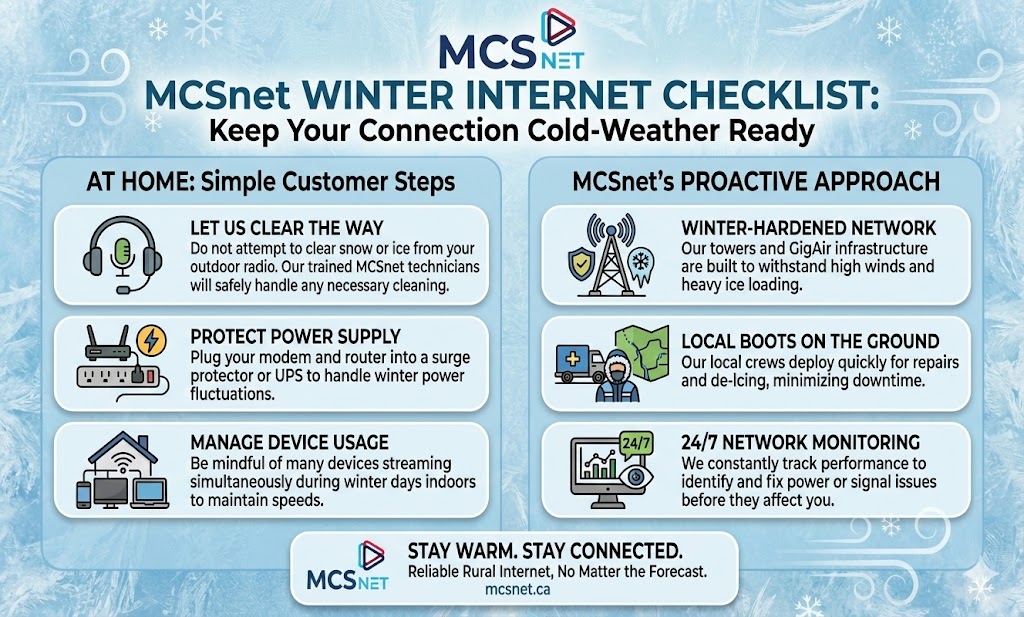
For day-to-day weather conditions, most customers won’t notice any change in performance. During severe storms, brief disruptions can happen, but proper equipment care (surge protection, secure mounting, weather-rated gear) keeps things stable.
MCSnet is Built for Rural Alberta
Because we live and work in the countryside, we build for the rural Alberta weather. Our network is engineered for resilience and able to give you consistent high speed during winter weather in rural Alberta and areas with MCSnet coverage. If your internet speed or signal is affected, our local team moves fast, typically within one business day.
Explore MCSnet plans designed for reliability and fewer interruptions.
Related Articles
October is Cybersecurity Month: Top Tips for Online Safety
Online Safety Tips for Seniors: Navigating the Digital Landscape Safely

How Much Internet Do You Need for Your Business? Here’s What to Consider