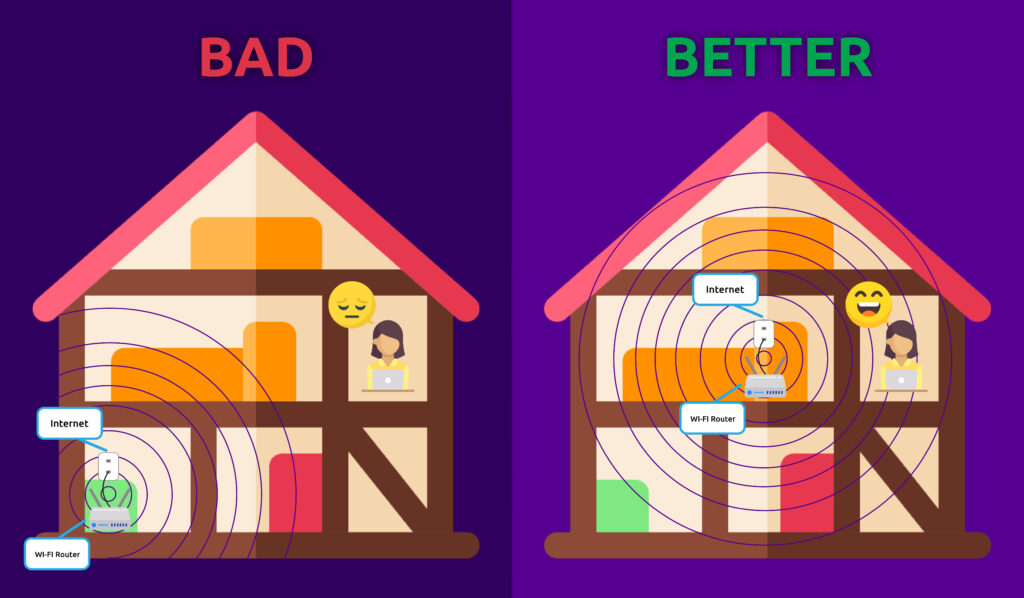
The physical placement of your MCSnet Wi-Fi router can significantly impact your network’s speed, range, and reliability. Here are key considerations for finding the optimal spot:
1. Central Location is Key
- Rule of Thumb: Imagine your Wi-Fi signal as a circle expanding outwards from your router. For the most even coverage throughout your home or office, place the router as close to the geographical center as possible.
- Avoid Corners: Placing a router in a corner or against an outer wall will broadcast a significant portion of its signal outside your desired area.
2. High and Clear
- Elevate It: Radio waves tend to travel downwards. Placing your router on a higher shelf, on top of a cabinet, or even mounted on a wall helps the signal propagate more effectively throughout the space, especially to devices on lower floors.
- Clear Line of Sight: Obstructions are the enemy of Wi-Fi signals. Keep your router away from large objects, especially those made of dense materials like:
- Thick Walls: Concrete, brick, and stone walls significantly attenuate Wi-Fi signals.
- Appliances: Refrigerators, microwaves, washing machines, and even fish tanks can interfere with signals due to their metal components and water content.
- Metal Objects: Large metal furniture, filing cabinets, or even metal studs in walls can block signals.
3. Minimize Interference
- Other Electronics: Many household devices operate on similar frequencies as Wi-Fi, particularly the 2.4 GHz band. Keep your router away from:
- Cordless phones
- Microwave ovens
- Baby monitors
- Bluetooth devices
- Other Wi-Fi routers (from neighbors, if possible)
- Electrical Interference: Large electrical appliances or power lines can generate electromagnetic interference. Try to keep your router away from these sources.
4. Avoid Basements and Closets
- Basements: While a basement might seem like a good place to hide a router, it’s often a signal grave. The ground and thick foundation walls will severely limit signal penetration to upper floors.
- Closets and Cabinets: Enclosed spaces can trap the Wi-Fi signal and lead to overheating, which can degrade performance and shorten the router’s lifespan.
5. Consider Multi-Story Homes
- Middle Floor: In a multi-story home, the most effective placement for your MCSnet router is often on the middle floor. This allows the signal to propagate both upwards and downwards..
By understanding how Wi-Fi works and thoughtfully choosing your MCSnet router’s location, you can significantly improve your wireless network’s performance, ensuring a faster, more reliable, and frustration-free online experience.