
Is 50 Mbps fast enough? What about 100 Mbps? Do I need 1000 Mbps?
There’s a reason why these are some of the most common questions we hear from customers when selecting a plan. If you’re not especially techie, looking at the different speeds when selecting an internet plan can leave you scratching your head.
In today’s world, good internet speed can be the difference between moving quickly through your day and being endlessly frustrated by lag and buffering. At MCSnet, we know that matching you up with the right internet speed for your needs is crucial and we’re happy to help.
In this comprehensive guide, we’ll explain how much speed is required for various online activities, how to determine your own speed needs, how to test your current speeds, what may be slowing your internet down, and even provide some plan options.
Let’s get started with a quick dive into 50 Mbps and what that means for internet speed.
How fast is 50 Mbps?
If you’re asking, “What is Mbps and why does it matter?”, we’ll break it down for you.
Mbps means megabits per second, which is how we quantify how much data your internet connection can transfer to your device in one second. This unit of measurement is an industry standard for describing the speed you can expect in an internet plan for uploading and downloading content.
Megabit (written as Mb) is commonly confused with megabyte ( written as MB), which is a different measurement (1 megabyte = 8 megabits). Also, Mbps is megabits per second, while MBps is megabytes per second. For a more in-depth explanation, we break it down further here.
When thinking about 50 Mbps in terms of speed, you can get a general idea of how fast a download will take if you know its size. Here is a quick formula to determine download and upload speed:
Size [MB] / Speed [MBps*] = Time [seconds]
*50 Mbps (megabits per second) is equal to 6.25 MBps (megabytes per second)
For example, if you’re downloading music that is 100 MB (megabytes) in size, at 50 megabits per second (or 6.25 megabytes per second), you could figure that out using the formula:
100 MB / 6.25 MBps = 16 seconds
So, this file will take about 16 seconds to download or upload at 50 Mbps.
Of course, this isn’t a perfect science. Often, we have other factors at play that can impact our internet speed. We’ll get into more detail on this next.
Internet speed: not as simple as Mbps
Often, slow internet speeds are the result of a number of factors that have nothing to do with your internet plan. Here are some common ones:
Network congestion
You may already know that running multiple devices at once can have a significant impact on your internet speed. But did you know that your network may be slowed down before the internet even reaches your home?
Just like rush hour traffic, your internet can experience its own version of congestion (commonly referred to as peak-time lag). This is the result of numerous users across your provider’s network drawing bandwidth at the same time, commonly during evening hours.
At MCSnet, we use a private network specifically designed for rural Alberta, so our customers experience the best possible speeds. Keep in mind that we still connect to the main internet exchange, but by using dedicated Google and Netflix servers, for example, your connection to these services isn’t going all the way to the main Seattle internet exchange and back.
Quality of cables
Since the advent of Wi-Fi, several of us think cables are a thing of the past. But our cables that carry data to and around our home can significantly influence the speed and quality of our connection.
Our advice? Don’t cheap out on ethernet cables, and ensure your cables can support the speeds you need. Secondly, make sure your ethernet cables are set up correctly for faster internet.
Device capability
If you’re still using the same devices you have for years, it may be time to upgrade – especially if you have a new high-speed internet plan. Your device’s processor might not be able to handle your internet speeds.
Routers are another example. Older routers weren’t built for the internet speeds of today and can throttle high speeds, turning your waterfall of data into just a trickle.
If you’re a customer of ours, don’t worry – we ensure our customers are always using the right router for their plan.
Weather and wireless download speed
All networks, especially space-based satellite networks, can suffer from network slowness during heavy precipitation/storms, extreme temperatures, wind, and more. Ensure that your provider has the infrastructure built for the rough and extreme conditions found in rural Alberta.
You should now have a general understanding of what Mbps means, how to figure out speeds based on file size, and the barriers that may stand in your way of experiencing your full network speeds. Now, let’s get into the good stuff: will 50 Mbps cut it for your lifestyle?
Is 50 Mbps good for streaming and gaming?
When it comes to selecting the right internet speeds, two bandwidth-heavy activities stand out among the rest: modern streaming and gaming. If you’ve ever had a movie marathon interrupted by buffering, or a high score opportunity cut short by lag, you understand the frustration of internet speeds that just can’t keep up with your lifestyle.
To begin, let’s look at streaming and how 50 Mbps stacks up for your next Netflix binge:
Streaming internet in 4K
Not that long ago, 1080p was the gold standard for streaming movies and TV. Today, we are able to stream in even better clarity in 4K (which requires five times more data than 1080p!), and as of very recently, 8K is quickly taking the world by storm.
As the world of graphics and clarity advances quickly, so must our internet to transmit the data required for crisp, high-definition imagery.
Is 50 Mbps enough?
Streaming in 4K requires about 25 Mbps of speed (Consumer Reports, 2019) for consistent streaming and no buffering. This gives you a bit of wiggle room to use other devices at the same time, but if you have several movie buffs or YouTube lovers in your household streaming in 4K at once, you may experience some buffering and slowness. If this is the case, a plan with higher Mbps is best for you.
Gaming at the speed of light
Similar to the advancements in streaming TV and movies, upgraded gaming systems with advanced graphics and immersive experiences require significantly more bandwidth than gaming consoles even just a few years ago. When it comes to gaming, speed is crucial, but a reliable connection is the real game-changer.
Additionally, games tend to require frequent updates to patch any bugs or glitches. When you have sufficient bandwidth, these updates are quick and painless. But on slower plans, these updates can take a long time and seriously impact your gaming experience.
Is 50 Mbps enough?
If you enjoy online, browser-based, or app-based games, 50 Mbps should be plenty to support your gaming – a 5 Mbps speed should be all you need per game.
However, if you are using high-end gaming consoles, especially with virtual reality immersive games, you will need a lot more in terms of bandwidth. As a general rule, anything less than 25 Mbps (Stream Scheme, 2023) and you run the risk of lag.
If you live in a household where several devices are accessing the internet at once, 50 Mbps may be cutting your bandwidth a bit close. If you have another gamer or movie streamer using the internet at the same time, you definitely should explore plans with bandwidth higher than 50 Mbps.
Latency and gaming
Another factor to consider when selecting a plan as a gamer is latency. Latency, or “ping”, is crucial for a responsive gaming experience. At MCSnet, our network is among the lowest for latency (a good thing for gamers!), so you know that your gaming experience is seamless.
For the majority of streamers and gamers, a 50 Mbps plan should be plenty for a seamless experience. This speed supports the demands of these high-bandwidth activities while offering the reliability of direct-to-home fiber optic connection.
If your network needs to support more than one high-bandwidth activity at once, it may be a good idea to invest in a higher bandwidth plan to ensure your activities are seamless. You can review our residential plans here.
Streaming and gaming are just two high-bandwidth activities to consider when selecting the right plan for you. Next, we’ll get into the world of downloading, uploading, and additional devices.
Downloading and uploading on 50 Mbps
These days, with the ease of posting on social media and downloading recipes for dinner, we are all actively downloading and uploading content constantly.
As more of us work from home than ever, hefty file downloads and video conferences can require a large chunk of our bandwidth. Downloading or uploading large files on a slow internet plan can feel like an eternity.
So how does 50 Mbps stack up for these daily activities? The answer: as always, it depends.
What’s the difference between downloading and uploading?
Before we get into some time estimates, we’ll begin by explaining the difference between downloading and uploading. While downloading brings content to your device from the internet, uploading sends data from your device out into the internet.
Streaming a movie is a form of downloading since the movie is being brought to your device. Sending an e-mail is a form of uploading since you’re sending data out from your device into the internet. Video conferencing uses both downloading and uploading, since you’re viewing others and they’re viewing you simultaneously.
When selecting an internet plan, be aware of both the download and upload speeds, as they can often be different.
How fast is 50 Mbps for downloading and uploading?
Here are some time estimates for common tasks on a 50 Mbps plan. It’s important to note that, again, these estimates assume that no other devices are using the internet, so they can vary greatly.
How fast is 100 Mbps?
When thinking about 100 Mbps in terms of speed, you can get a general idea of how fast a download will take if you know its size. Here is a quick formula to determine download and upload speed:
Size [MB] / Speed [MBps*] = Time [seconds]
*100 Mbps (megabits per second) is equal to 12.50 MBps (megabytes per second)
For example, if you’re downloading music that is 100 MB (megabytes) in size, at 100 megabits per second (or 12.50 MBps megabytes per second), you could figure that out using the formula:
100 MB / 12.50 MBps = 8 seconds
So, this file will take about 8 seconds to download or upload at 100 Mbps.
Is 100 Mbps good for streaming and gaming?
When choosing the right internet speeds, two bandwidth-intensive activities stand out: modern streaming and gaming. If buffering has disrupted your movie marathon or lag has ended your high score attempt, you know the frustration of inadequate internet speeds.
Let’s start by assessing streaming and how 100 Mbps handles your next Netflix binge:
Streaming in 4K
Not long ago, 1080p was the standard for streaming movies and TV. Today, we can stream in 4K, which needs five times the data of 1080p, and 8K is rapidly gaining popularity.
As graphics and clarity advance, our internet speeds must also keep up to handle the data needed for sharp, high-definition visuals.
Is 100 Mbps enough?
Streaming in 4K requires around 25 Mbps for consistent playback without buffering (Consumer Reports, 2019). This speed allows room for other devices to be used simultaneously. However, if multiple people in your household stream 4K content simultaneously, buffering and slowness might occur. In this case, a plan with a higher Mbps would be more suitable.
Gaming at the speed of light
Gaming systems now feature cutting-edge graphics and immersive experiences that need significantly more bandwidth than older consoles. Speed is essential for gaming, but a stable and reliable connection is crucial. Games often require updates to fix bugs or glitches, and with adequate bandwidth, these updates are quick. However, slower connections can lead to lengthy updates that disrupt the gaming experience.
Is 100 Mbps enough?
For online, browser-based, or app-based games, 100 Mbps is usually sufficient, and each game typically requires about 5 Mbps. High-end gaming consoles, especially for virtual reality, need significantly more bandwidth, with anything less than 25 Mbps risking lag (Stream Scheme, 2023). In households with multiple devices accessing the internet simultaneously, 100 Mbps may be limiting. If another gamer or movie streamer is online at the same time, consider plans exceeding 100 Mbps.
Latency and gaming
Review the available MCSnet residential plans for more details.
Streaming and gaming are just two high-bandwidth activities to consider when selecting the right plan for you. Next, we’ll get into the world of downloading, uploading, and additional devices.
Downloading and uploading on 100 Mbps
With the ease of posting on social media and downloading recipes, we’re constantly downloading and uploading content. As more people work from home, large file downloads and video conferences can significantly consume bandwidth.
Slow internet plans make these tasks feel excruciatingly long. How does a 100 Mbps plan hold up for these activities? As always, it depends on your specific usage needs.
How fast is 100 Mbps for downloading and uploading?
Here are some time estimates for common tasks on a 50 Mbps plan. 100Mbps plan will be twice as fast. It’s important to note that, again, these estimates assume that no other devices are using the internet, so they can vary greatly.

If you want faster speeds, doubling your 50 Mbps plan to 100 Mbps will cut these times in half.
Overall, if you’re an average user with small-to-moderate downloads and uploads, 50 Mbps should be plenty for your needs. If you have above-average download needs working with large files (like a photographer or graphic designer), you may want to opt for higher bandwidth.
Additionally, if there are several users in your household, you also may want the extra speed on your plan. We’ll explain more about that next.
How many people can use 50 Mbps?
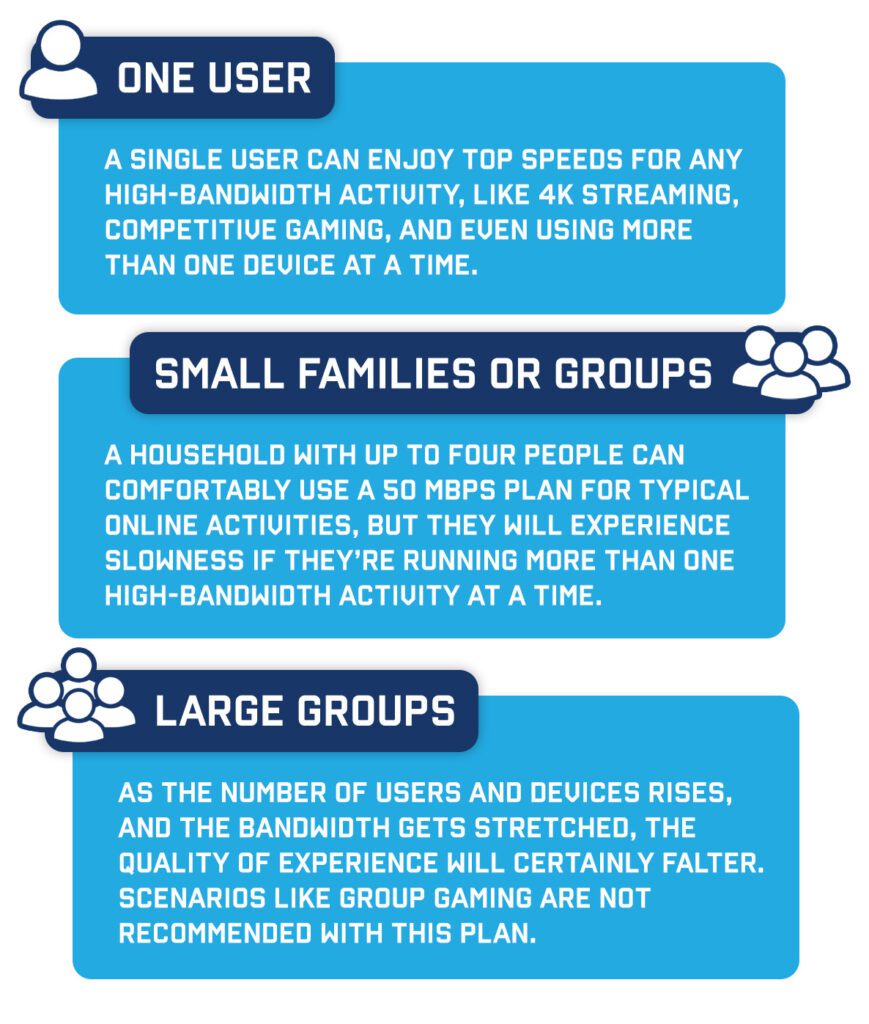
While a 50 Mbps plan should provide a solid foundation for multiple users to engage in various online activities at the same time, it depends on how much bandwidth is being used at once. Understandably, a household with multiple devices streaming or gaming at once can seriously impact speed and experience!
Here is how a 50 Mbps plan would perform in the following scenarios:
Speed aside – how much data do I need?
When it comes to determining your specific data needs, we can help. We break it down for you in our blog post and Internet Buyer’s Guide.
If you need a plan that can keep up with your heaviest bandwidth demands, we have a variety of residential plans perfect for all different types of users. Review our internet plans here.
Testing your internet speeds
Before making the switch to a different ISP or plan, you can perform an internet speed test to see what speeds you’re currently working with. Regularly checking your internet speed is a good practice to ensure you’re receiving the service you’re subscribed to. Follow the steps below or learn more about how to test your internet speed here.
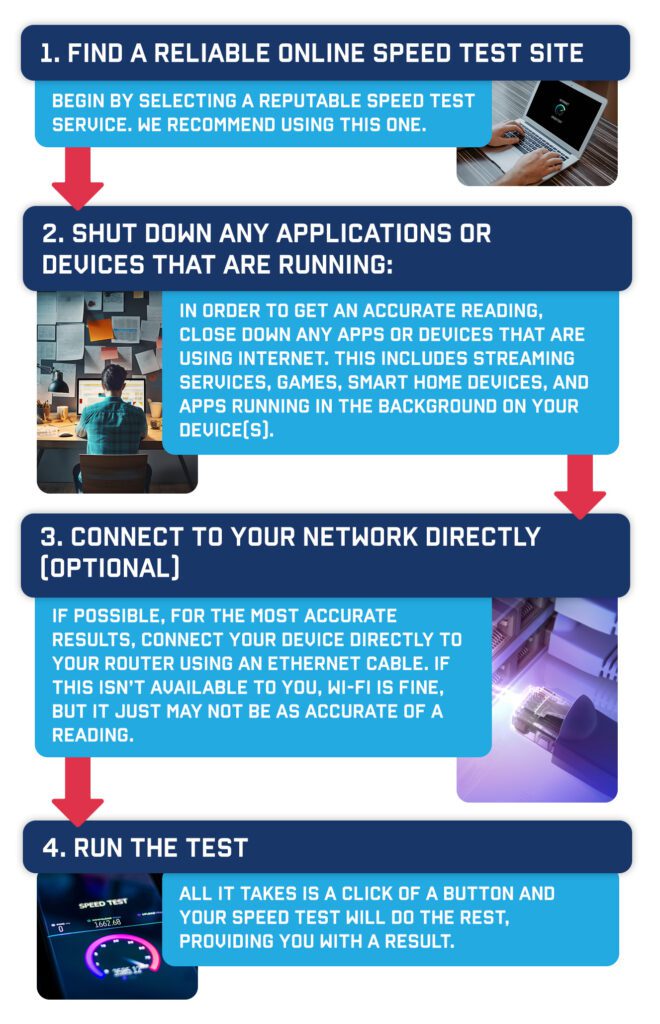
After completing your test, you’ll notice metrics about your connection, but remember, our plans are centered around traffic caps, not specific speed rates. We strive to provide the best possible speed by optimizing your connection to the nearest tower. While speed readings may vary, they are influenced by factors like network congestion, server distance, and background device activity.
Additionally, you’ll see a metric known as Latency or Ping. This is crucial as it indicates the responsiveness of your connection, with lower numbers being preferable. Ideally, your latency should be between 20-40 milliseconds (ms), ensuring a smoother, more efficient online experience.
If your internet speed is strong, but you’re experiencing slowness that seems out of character for your activities, you may want to consider an internet speed booster before switching to another plan (learn more here).
Once you have an understanding of your download speeds, upload speeds, and latency, you can head into the next phase of the decision to switch.
Deciding to switch: Evaluating speed and need
By now, you should have a general understanding of what a 50 Mbps plan can do for you and how much speed you’re currently getting. Now, it’s time to piece everything together. Here is a checklist to go through before deciding to switch.
Key considerations before switching internet plans
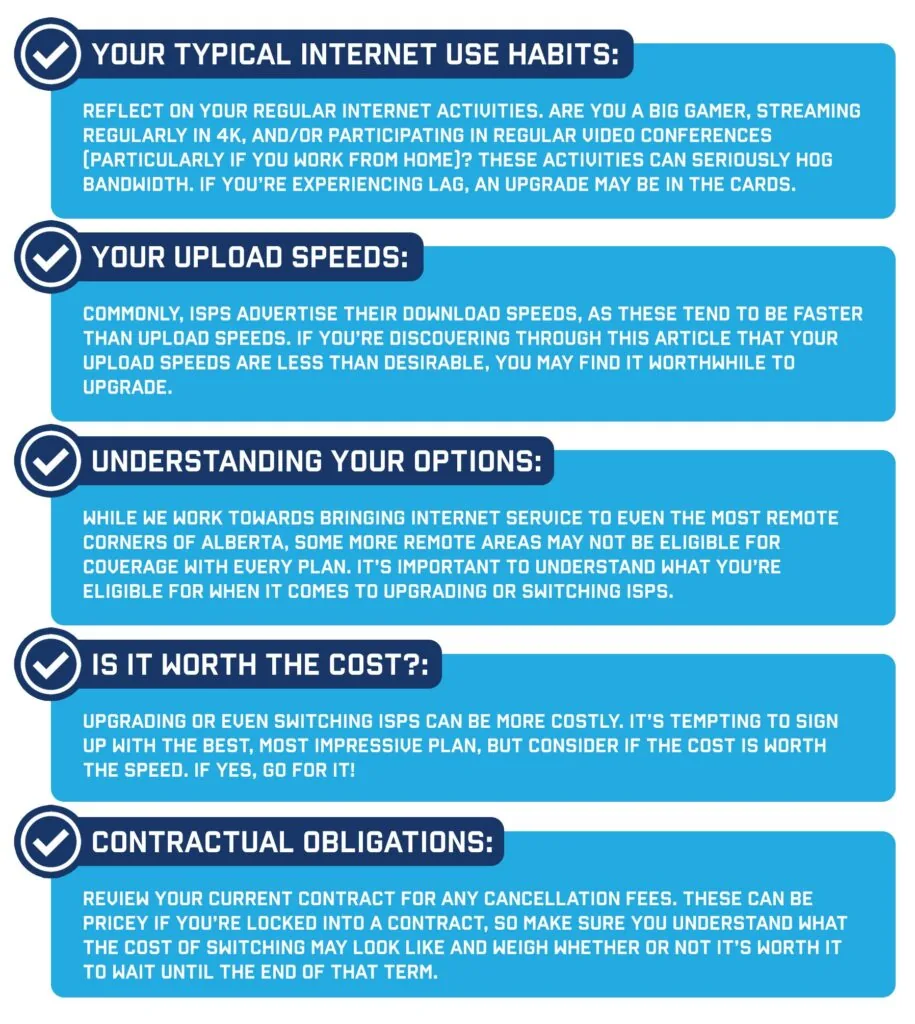
Ultimately, if you’ve determined that you are ready for an upgrade, we hope we’ve equipped you with the knowledge to select the best plan for your needs.
If you’re still on the fence, we have one more key consideration for you as you make this decision: making sure your internet can keep up with the advancements coming our way.
Future-proofing your internet
If there’s one thing we know for sure about the future, it’s that there’s no slowing down tech advancements. In fact, the demand for global data traffic increases by 40% every year (McGill, 2023).
As streaming becomes clearer, gaming becomes more immersive and realistic, and working from home becomes more widespread, we are going to continue to need more and more from our internet speeds.
If you’re signing a contract, you want to ensure that your internet speeds will support your activities that entire term. Investing in higher speeds today may set you up for a seamless internet experience tomorrow.
Do most people really need 1000 Mbps?
No. For roughly 80% to 90% of households, 1000 Mbps is total overkill.
Basic online activities use surprisingly little bandwidth:
- Netflix in 4K: ~15–25 Mbps
- Zoom Video Call: ~3–4 Mbps
- Spotify / Web Browsing: < 5 Mbps
A household of four people where two adults work from home and two kids stream 4K video simultaneously barely consumes 50-100 Mbps at peak usage.
Who Actually Benefits from 1000 Mbps?
While optional for average users, 1 Gig is a genuine necessity for four specific groups:
- Large/Dense Households (5+ Heavy Internet Users): Homes where multiple people are simultaneously streaming 4K video, attending Zoom calls, uploading files, and gaming online.
- Hardcore Gamers: Modern games (like Call of Duty) regularly require 100 GB+ downloads and frequent multi-gigabyte patches. 1 Gig reduces hours of waiting to a few minutes.
- Content Creators & Remote Professionals: Videographers, designers, and software engineers who constantly upload massive 4K video files, RAW photo folders, or large codebase archives to cloud servers benefit heavily.
- Smart Home Super-Users: Residences running dozens of cloud-connected security cameras, smart TVs, IoT appliances, and background cloud backups simultaneously.
TL:DR:
Don’t pay for capacity you won’t use. 50 to 100 Mbps is the sweet spot for everyday reliability and budget-conscious households. Upgrade to 1000 Mbps only if long download bars are disrupting your workflow, or if your household routinely experiences speed drops when everyone gets online at the same time.
Conclusion
To wrap up this guide, let’s go back to our initial question: is 50 Mbps fast enough?
Ultimately, it depends! 50 Mbps should be sufficient for a single user to engage in even the most demanding activities or general internet use for several users. If several users are relying on 50 Mbps for high-bandwidth activities, they may experience some lag, and a higher-speed plan may be best.
Deciding to make the switch to a better plan or different ISP is not easy, nor is it one that should be taken lightly. Hopefully, by now, you have gained a better understanding of your internet needs and whether or not making the switch is the right decision for you.
When you sign up with us, you get unmatched customer service (our St. Paul-based customer service team answers our calls – no dealing with robots here!) and a commitment to serving rural Alberta.
Connect with us today and we’ll match you up with the best plan for your needs.
Internet Speed Questions We’re Asked Frequently
No, 50 Mbps is not slow, and most average users will find it suits their daily activities well. 50 Mbps might be too slow for high-bandwidth households, especially if gaming, streaming in 4K or 8K, or with several users accessing the internet at once.
Yes, 50 Mbps is generally fast enough to handle most average work from home activities, including seamless video conferencing, small-to-moderate file uploads, and emails.
However, if you do the type of work that requires frequent large file uploads and downloads, or if multiple people are working from your home at once, you may want to opt for a faster plan.
Yes, 50 Mbps is good for 4K streaming. As a general rule, 25 Mbps is the minimum speed recommended for 4K streaming. However, if you’re streaming in 8K or have more than one internet user streaming at once, you may run into some buffering delays.
50 MB and 50 Mb are commonly confused, but these are two different measurements. MB (megabytes) is used to measure data usage and caps in an internet plan, while a Mb (megabit) is 1/8th the size of a megabyte and is used to measure speed per second.
50 MB of data is an incredibly small amount of data in your internet plan. For context, you use about 1GB (1000 MB) of data per hour of streaming.
Conversely, 50 Mbps (megabits per second) of internet speed is relatively fast and could download that 1 GB of data in under 3 minutes.
No, 100 Mbps is not slow and should suit the daily activities of most average users well. However, it might be too slow for high-bandwidth households, especially if they’re gaming, streaming in 4K or 8K, or if multiple users are accessing the internet simultaneously.
In most cases, yes, a 100 Mbps (Megabits per second) internet connection is generally considered fast enough to support common work-from-home activities for an average household. This bandwidth should be sufficient for seamless video conferencing on platforms like Zoom, Microsoft Teams, or Google Meet, which typically require download speeds of 1.5-3 Mbps for high-quality 1080p video.
Additionally, a 100 Mbps plan can comfortably handle common tasks such as sending and receiving emails, browsing the web, streaming music from services like Spotify or Apple Music, and uploading or downloading small-to-moderate file sizes commonly associated with office work.
However, it’s important to note that if your work involves frequent large file uploads or downloads, such as transferring high-resolution videos, CAD files, or large databases, a 100 Mbps connection may feel somewhat constrained, especially if multiple people in the household are working from home simultaneously and sharing the bandwidth.
Yes, a 100 Mbps (Megabits per second) internet connection is generally considered good and sufficient for streaming 4K (3840 x 2160 resolution) content from popular platforms like Netflix and YouTube. Both Netflix and YouTube recommend a minimum download speed of around 25 Mbps for seamless 4K streaming.
With a 100 Mbps plan, you should be able to stream 4K videos on these platforms without any significant buffering or quality issues. In fact, this bandwidth would allow you to stream multiple 4K streams simultaneously, as long as you don’t have too many other bandwidth-intensive activities running concurrently.
However, it’s important to note that if you plan to stream content in even higher resolutions, such as 8K (7680 x 4320), or if you have multiple people in your household streaming 4K content simultaneously across different devices, a 100 Mbps connection may start to feel constrained, and you might encounter occasional buffering delays or quality dips.
In such scenarios, or if you frequently engage in other high-bandwidth activities like online gaming, video conferencing, or large file transfers while streaming, it may be advisable to consider upgrading to a faster internet plan.
100 MB (megabytes) and 100 Mb (megabits) are different measurements often confused. MB measures data usage and caps in an internet plan, while Mb, being 1/8th the size of a megabyte, measures speed per second.
100 MB of data is a small amount within an internet plan. For reference, streaming uses around 1 GB (1000 MB) per hour. Conversely, 100 Mbps (megabits per second) is relatively fast and can download 1 GB of data in under 2 minutes.
Consider upgrading only if your household habits change significantly. If you start working full-time in video production, add multiple heavy gamers who regularly download 100 GB game patches, or expand your household to 5+ active internet users streaming concurrently, upgrading to Gigabit will save you time. Otherwise, stick with 50–100 Mbps and keep the savings.
Buffering is usually caused by a weak Wi-Fi signal or local network congestion, not a slow internet plan. Obstructions like concrete walls, distance from the router, or outdated router hardware degrade speed over Wi-Fi. Upgrading to a 1,000 Mbps plan won’t fix dead zones in your home; investing in a modern mesh Wi-Fi system or relocating your router will.
No. Bandwidth (Mbps) measures how much data can travel at once, whereas latency/ping (measured in milliseconds) measures how fast data travels between your device and the game server. Online gaming uses very little bandwidth (around 3 to 6 Mbps). A 1,000 Mbps connection won’t reduce your ping compared to a 100 Mbps connection on the same network technology. For the lowest latency, plug your gaming device directly into the router via an Ethernet cable.
A 100 Mbps plan can easily support 10 to 15 connected devices doing everyday tasks like social media, smart home automation, background updates, and light browsing. When it comes to high-bandwidth tasks, 100 Mbps can run up to four simultaneous 4K video streams without buffering.
